The Copier Company
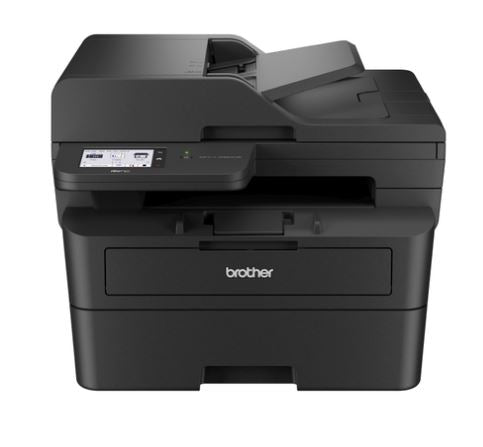
Brother MFC-L2880DW Laser Multifunction Printer
Brother MFC-L2880DW Laser Multifunction Printer
Couldn't load pickup availability
General
Engine Mono Laser
Warranty 1 Year Return To Base
Display
LCD Display 8.8cm Colour LCD (Touchscreen)
Shortcuts 18
Printer
Standard Memory 256MB
Print Speed⁹ Up to 34ppm
2 Sided Print Yes (Automatic)
2 Sided Print Speed⁹ Up to 16 sides per minute / 8 sheets per minute
Printer Resolution 1200 x 1200dpi
First Print Out Time10 Less than 8.5 secs from Ready mode, Less than 17.5
secs from Sleep mode
Printer OS Compatibility³ Windows 11, Windows 10 (32&64bit), Windows Server
2022, Windows Server 2019, Windows Server 2016,
Windows Server 2012/R2 (64bit)
macOS 11-13
Linux Cups, LPD/LPR
Emulation PCL6, BR-Script3, PDF Version 1.7
Resident Barcodes Code39, Interleaved 2 of 5, FIM(US-PostNet), Post
Net(US-PostNet), EAN-8, EAN-13, UPC-A, UPC-E,
Codabar, ISBN(EAN), ISBN(UPC-E), Code128 (set A,
set B, set C), EAN128 (set A, set B, set C), Code93,
GS1Databar, MSI
Quiet Mode⁴ Yes
Recommended Monthly Print
Volume⁸
250 to 2,500 pages
Digital Copier
Copier Speed Up to 34 cpm
First Copy Out Time Less than 10 secs from Ready mode, Less than 19
secs from Sleep mode
2 Sided Copy Simplex Scan to Duplex Print
Copier Resolution Maximum 600 x 600 dpi
Reduction-Enlargement Ratio 25 - 400 percent in 1 percent increments
Copier N-in-1 2 in 1 & 4 in 1 (A4/LTR)
Copier Multi Sort Yes
Copier Multi Stack Up to 99 copies
Fax
Modem Speed 33,600bps (Fax)
macOS 11-13
Linux Cups, LPD/LPR
2 Sided Fax Send/Receive
Colour Faxing N/A
ITU-T Group compatibility Super G3
Telstra Duet Compatible Yes
Speed Dials 200 locations
ECM Yes
Out of Paper Reception Up to 400 Pages (ITU-T Test Chart)
Broadcasting Up to 250 locations
Automatic Reduction Yes
Fax Forwarding To Fax number or Email Address
PC Fax Send/Receive from Windows. Send only from Linux
(Network / USB)
Internet Fax Yes - T37 protocol
Paper Handling
Standard Paper Capacity⁶ Up to 250 sheets
Manual Feed Slot 1 sheet
Envelopes Input 1 envelope (Single Feed Slot only) output via rear
Output Paper Capacity Up to 120 Sheets Face Down (80gsm)
1 sheet face-up (straight paper path)
ADF⁶ Up to 50 sheets
Media Weights Paper Tray 60 - 163 gsm
Media Weights Manual Feed Slot 60 - 230 gsm
Media Weights ADF 60 - 105 gsm
Media Weights Duplex 60 - 105 gsm
Media Size Paper Tray A4, Letter, B5(JIS), B5(ISO), A5, A5(Long Edge), B6(JIS),
A6, Executive, A4 Short, 16K(195x270mm)
Media Size Manual Feed Slot 76.2 to 215.9mm(W), 127 to 355.6mm(L), Envelope:
COM-10, DL, C5, Monarch
Media Size ADF Width 105 to 215.9 mm, Length 147.3 to 355.6 mm
Media Size Duplex A4
Media Size Scanner Glass Up to A4/LTR
Media Types Paper Tray Plain Paper, Thin Paper, Recycled Paper, Thick Paper
Media Types Manual Feed Slot Plain Paper, Thin Paper, Thick Paper, Thicker Paper,
Recycled Paper, Bond, Label, Envelope, Env. Thin, Env.
Thick
Media Types ADF Plain Paper, Recycled Paper
Media Types Duplex Plain Paper, Thin Paper, Recycled Paper
Digital Scanner
Scanner Colour/Mono Colour
Scanner Colour Depth 30 bit input / 24 bit output colour
Scanning Technology Dual CIS
Scanner Speed12 Simplex ADF: 22.5/7.5 ipm
Duplex ADF: 22.5/7.5 ipm
Flatbed: 2.39/7.2 secs @300dpi (Mono/Colour)
In accordance with ISO/IEC17991 (A4)
Scanner Resolution (Optical) From Glass: Up to 1200 x 1200 dpi
From ADF: Up to 600 x 600 dpi
Scanner Resolution (Interpolated) Up to 19,200 x 19,200 dpi
Scanning Area ADF: 204(W) x 291(L)mm
Flatbed: 204(W) x 291(L)mm
Scanner Grey Scale 256 levels
Scan to Email Client Yes
Scan to Email Server Yes
Scan to OCR Yes
Scan to Image Yes
Scan to File Yes
Scan to FTP FTP/FTPS
Scan to Sharepoint Yes (iPrint&Scan for Windows only)
Scan To Cloud Yes - see Web Connect
Network Scan Windows/Mac
Scanner OS Compatibility³ Windows 11, Windows 10 (32&64bit)
macOS 11-13, Linux Sane
Twain Compliant Windows: TWAIN or WIA
Linux: SANE
Software
N-up Printing Windows/Mac
Poster Printing Windows only
Header and Footer Printing Windows only
Watermark Printing Windows only
Booklet Printing Windows only
Archive Printing Windows only
Driver Deployment Wizard Windows only
Networking
Wireless Mode 2.4GHz IEEE 802.11b/g/n (Infrastructure), 5GHz IEEE
802.11a/n (Infrastructure), IEEE 802.11a/n (Wi-Fi Direct)
Wireless Setup Support Utility Wi-Fi Protected Setup (WPS)
Network Protocols IPV4 ARP, RARP, BOOTP, DHCP, APIPA(Auto IP), WINS/
NetBIOS name resolution, DNS Resolver, mDNS,
LLMNR responder, LPR/LPD, Custom Raw Port/
Port9100, SMTP Client, IPP/IPPS, POP3, FTP Client
and Server, SNMPv1/v2c/v3, HTTP/HTTPS server,
TFTP client and server, ICMP, Web Services (Print/Scan),
SNTP Client, IMAP4
Network Protocols IPV6 NDP, RA, DNS resolver, mDNS, LLMNR responder,
LPR/LPD, Custom Raw Port/Port9100, IPP/IPPS,
POP3, SMTP Client, FTP Client and Server, SNMPv1/
v2c/v3, HTTP/HTTPS server, TFTP client and server,
ICMPv6, Web Services (Print/Scan), SNTP Client, IMAP4
Email Alerts E-mail Notification and Reports
MFC-L2880DW I Page 4
Working with you for a better environment
At Brother, our green initiative is simple. We strive to take responsibility,
act respectfully and try to make a positive difference to help build a
society where sustainable development can be achieved. We call this
approach Brother Earth.
www.brotherearth.com
Environment
Power Consumption Peak: Average 920W, Ready: Average 43W, Sleep:
4.1W, Deep Sleep: 0.7W
Sleep Mode Yes (0-50 min)
Toner Save Yes
Power Save Yes
Others
Noise Level Sound Pressure Level: (Printing) Less than 49 dBA,
(Standby) Less than 30 dBA
Sound Power Level: (Printing) Less than 6.63 B,
(Standby) Inaudible
TEC Value 0.40 kwh/week
Carton Contents Printer, CD-ROM (including User’s Guide), Quick Setup
Guide, Telephone Line Cord, Telephone Line Cord
Adapter, Inbox Toner Cartridge 1,200 pages11, Drum
(DR2530) @ 15,000 pages, AC Power Cord
Consumables11
Consumables Standard Toner Cartridge (TN2530) Up to 1,200
Share